HTTPS and SSL
To have HTTPS pages on a website, you must first obtain an SSL certificate. You can get one for free from certificate authorities such as Let’s Encrypt, or purchase one from a paid certificate authority. Once you have obtained the certificate, you must install it on your web server. Next, you will need to configure your website to use HTTPS instead of HTTP. This may require changes to your web server configuration and to your website’s links and redirects. If you are not comfortable with these steps, it is recommended to call in a professional to help you.
What is an SSL
An SSL (Secure Sockets Layer) is a protocol for securing communications over the Internet. It allows for the encryption of data exchanged between a web server and a web browser, in order to protect sensitive information such as passwords, credit card numbers, etc. Using an SSL is particularly important for e-commerce and banking sites to ensure the confidentiality of user data
How to check that your SSL is properly configured on your website.
To check the proper configuration of an SSL certificate, you can use a free online tool like SSL Labs’ SSL Server Test. To use this tool, simply enter the address of the website you want to check in the search bar and click the “Submit” button. The tool will give you an overall grade for the site’s SSL configuration, as well as details on the strengths and weaknesses of the setup.
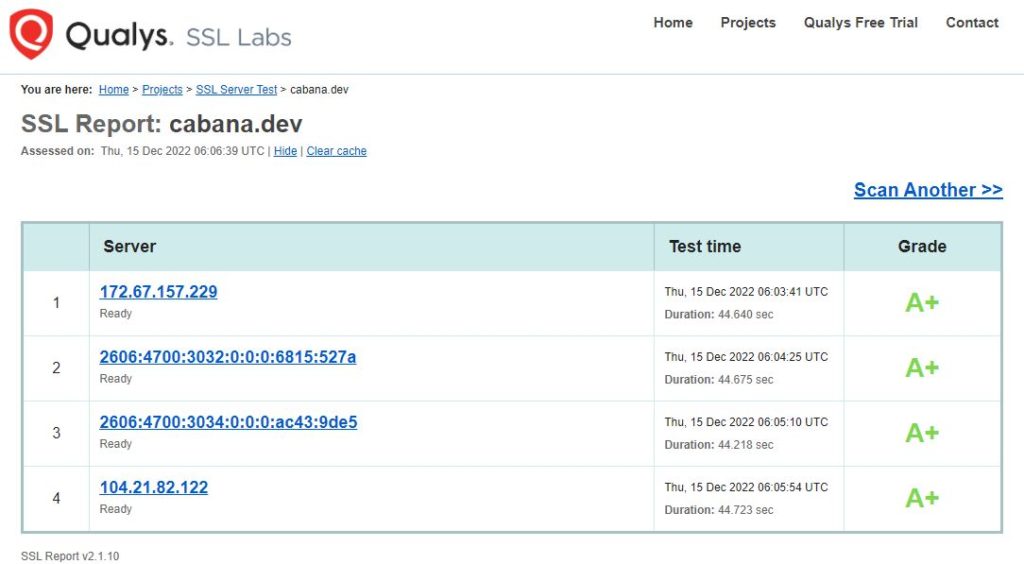
To get an A grade on SSL Labs, a site must have a perfect SSL configuration, meaning it uses the most recent and secure protocols and features. This can include things like using stronger encryption protocols, such as TLS 1.3, and using longer public keys to strengthen the security of the connection.
In general, a B grade on SSL Labs indicates that a site’s SSL configuration is solid, but that there are possible improvements to further strengthen the connection security. If you are the owner of a website that gets a B grade, you should review SSL Labs’ suggestions to see how you can improve your SSL configuration.
You can also check a site’s SSL configuration by looking at how the web browser displays the site’s address. If you access a site via HTTPS and the connection is secure, the browser will generally display a green padlock in the address bar. Click on this padlock to view detailed information about the SSL certificate used by the site, including the certificate authority that issued it and the certificate’s expiration date.
Google and SSLs
Google takes the presence of an SSL certificate into account when ranking search results. In general, a website with an SSL certificate can achieve a better ranking in search results than the same site without SSL. This can be particularly useful for sites that handle sensitive data, such as e-commerce or banking sites. Having an SSL can also improve user trust in a website, which can contribute to a better ranking in search results.
A “not secure” website warning may also appear to alert users that a website they are trying to visit is not secure. This warning can be displayed for various reasons, such as the absence of a valid SSL certificate or the use of an unsecure communication protocol (like HTTP instead of HTTPS).
In summary, here is why it is important to have an SSL on your website.
- Data encryption is one of the main reasons to have an SSL. It helps protect users’ sensitive information against hacker attacks and data theft.
- An SSL can improve user trust in a website by showing them that the information they provide on the site is protected.
- Avoid “not secure” website warnings displayed by browsers for sites that are not secured via HTTPS.
- Having an SSL can help improve a website’s SEO in search engines, as it can be taken into account in search result ranking algorithms.
- Finally, an SSL may be required for certain features or applications that require a secure connection, such as online payments or access to confidential data.

