What is PHP?
PHP is a server-side programming language used to develop websites and web applications. WordPress is an open-source content management system (CMS) that uses PHP to dynamically manage website content. PHP is used to execute WordPress code and display website content based on user requests. PHP is a crucial element for WordPress, as it allows the CMS to function in a dynamic and customizable way. Generally speaking, PHP is an important component for many websites that use WordPress as their CMS.
Why you should use an up-to-date PHP version
It is important to use an up-to-date PHP version for several reasons. First, PHP updates often include bug fixes and security improvements to protect your site against hackers and attacks. Second, updates can improve your site’s performance by fixing compatibility issues and making code improvements. Finally, by using an up-to-date PHP version, you ensure that your site works correctly with the latest versions of browsers and other technologies used on the Internet. Generally, it is recommended to use the latest stable version of PHP to benefit from the latest improvements and bug fixes.
The risks of NOT updating PHP
There are several risks to not updating PHP. First, by not updating PHP, you won’t benefit from the latest bug fixes and security improvements that can protect your site against hackers and attacks. This can lead to performance issues and security vulnerabilities on your site, making it susceptible to attacks or data breaches. Second, by not updating PHP, you risk encountering compatibility issues with the latest versions of browsers and other technologies used on the Internet. This can lead to errors and malfunctions on your site, which can harm the user experience. Overall, it is important to keep PHP up to date to avoid performance and security issues and to ensure your site functions correctly.
Is there any risk to updating PHP?
There is no major risk in updating PHP for WordPress. However, as with any software update, it is important to back up your site before proceeding. This will allow you to restore your site to its previous state if any issues occur during the update. It is also recommended to test the update in a staging environment or on a development site before applying it to your live production site. This allows you to verify that the update doesn’t cause any errors or malfunctions before applying it to your main site. Generally, it is important to take the necessary precautions before updating PHP for WordPress, but there is no major risk in doing so.
How to update PHP correctly
There are several steps to follow to properly update PHP for WordPress. First, make sure you have a recent backup of your site. This will allow you to restore your site to its previous state if there’s a problem with the update. Next, check that your web host supports the PHP version you want to use. Some PHP versions may require more recent or higher-performance hosting. Then, check that your WordPress themes and plugins are compatible with the PHP version you want to use. If some of your themes or plugins are not compatible, you will need to update or replace them before proceeding with the PHP update. Once you have verified all of this, you can proceed with the PHP update using your web hosting management interface or by contacting your host to do it for you. Finally, once the update is complete, check that your site is working correctly and resolve any issues that may arise.
What is the latest stable version of PHP?
The latest stable version of PHP is version 8.0. PHP 8 was released on November 26, 2020, and brings many new features and improvements compared to previous versions. PHP 8 uses a new JIT (Just-In-Time) execution engine to improve the performance of certain operations and features. PHP 8 also introduces new features such as union types, attributes, strict typing for functions, and nullsafe operators. PHP 8 is considered a major PHP release, and it is recommended to update websites and applications using previous PHP versions to benefit from its new features and performance improvements.
Why use PHP 8?
It is difficult to give a precise answer to this question because PHP execution speed depends on many factors, such as the code used, server configuration, and available resources. However, in general, PHP 8 is considered faster than PHP 7.4 thanks to its performance improvements and code optimization. PHP 8 uses a new JIT (Just-In-Time) execution engine that can improve the performance of certain operations and features. Additionally, PHP 8 also uses code optimization techniques to reduce execution times and improve overall performance. Generally, PHP 8 is considered faster than PHP 7.4, but the speed difference can vary based on specific use cases.
How to check which PHP version you are using
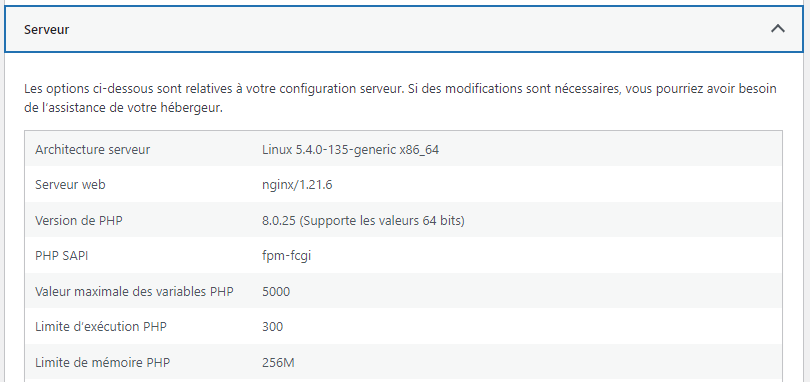
In your WordPress dashboard, you can quickly check which PHP version you are using by navigating to Tools > Site Health >
By opening the server tab, you should see the following:
You are hosted with us
We take care of moving you to the most up-to-date version of PHP. We perform all compatibility tests and can revert your PHP version if you have incompatible plugins.

